How to write a weekly project status update for your team and your client
A weekly status update answers four questions: what got done, what is due next, what is at risk, and what you need from whom. How to write one for your team and one for your client, and how Arkscape builds most of it from your project board.
 Arkscape7 min read
A weekly project status update answers four questions: what got done, what is due next, what is at risk, and what you need from whom. Write two versions from the same facts. The team version is about who is doing what and what is stuck; the client version is about milestones and the decisions you need from them. When both come from the work itself instead of from memory, the update takes minutes instead of an hour.
This guide is for architects, designers, and engineers running several projects with a team, consultants, and clients. The method works with any tool, including a spreadsheet. Along the way it shows how Arkscape, a project tracking tool built for this work, answers each question from your project board.
Why the weekly update takes an hour
Most updates are rebuilt from scratch every Friday. The status of the work lives in the weekly meeting, in email threads, in chat groups, and in people's heads, so writing the update means asking around and scrolling back. And the project plan says one thing while each person's own list says another, because they were never the same list.
The fix isn't a better template. It's keeping every task on the project's board with an owner and a date, so the update is a reading of what is already true.
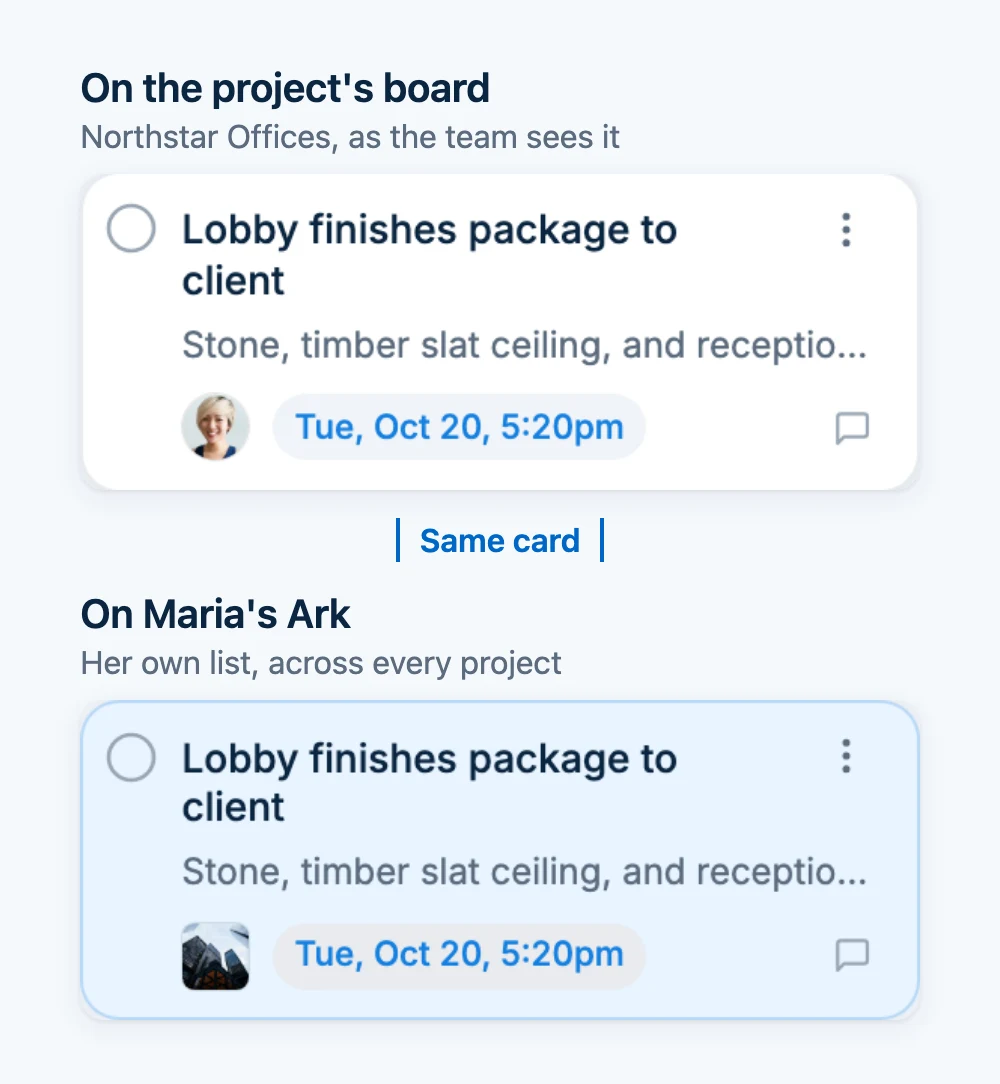
In Arkscape, that is how the work is kept to begin with. Each project has its own group with an Arkboard, and once someone takes on a card from the project's board, it is the same card on their Ark (their personal board). When someone ticks off a checklist on their own Ark, the project board shows it too. There is one list, so there is nothing to reconcile on Friday.
The four questions every update answers
1. What got done
Finished outcomes, not activity. "Issued the revised door schedule to the contractor" tells the reader something. "Worked on doors" doesn't.
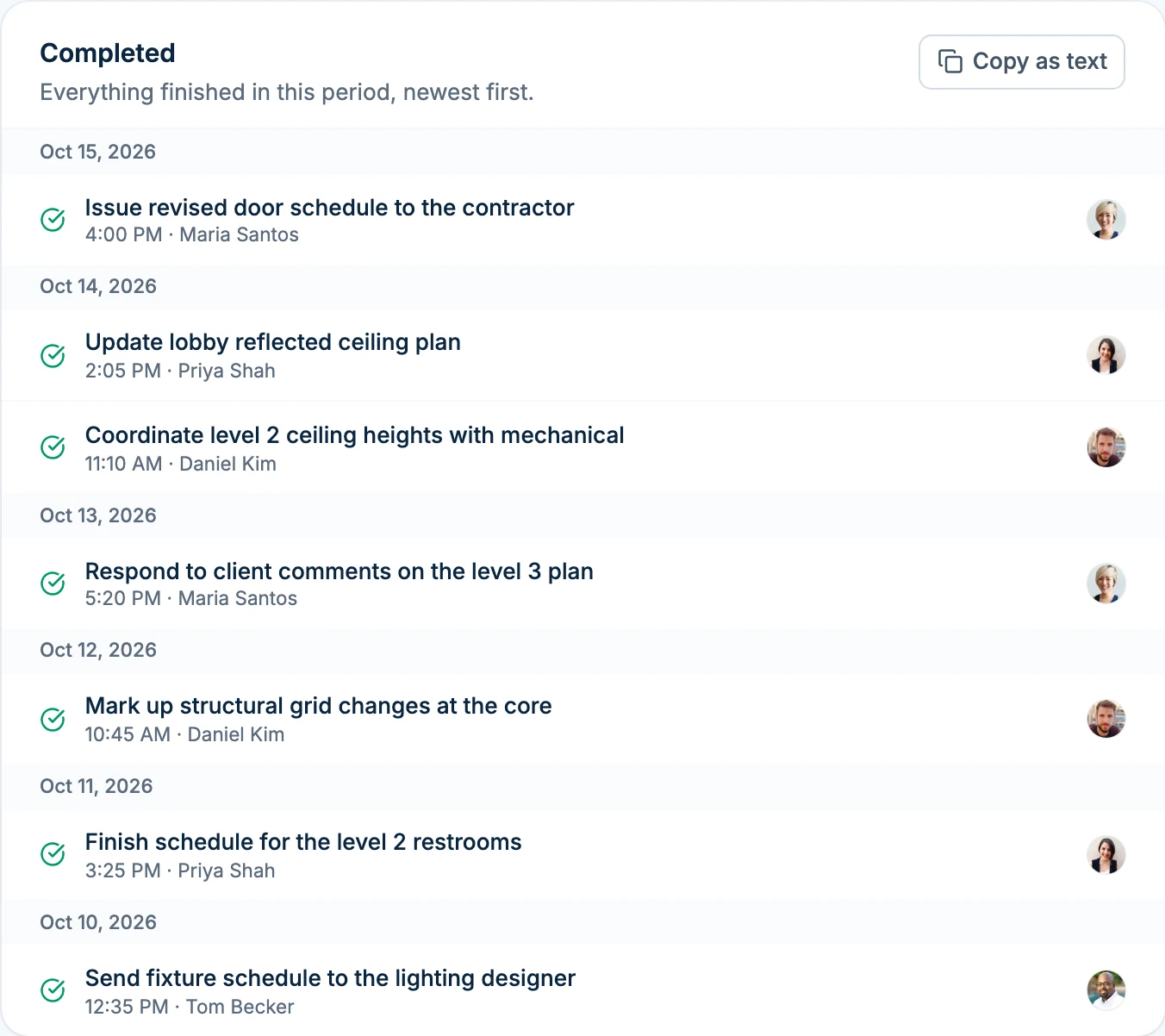
In Arkscape: open the group's Reports tab, choose 7 days, and press Copy as text on the Completed panel. You get the week's finished cards grouped by day, with who finished each one, ready to paste and trim.
2. What is due next
The next week or two, with dates and owners: "Structural to confirm beam sizes at the level 2 opening by Thursday."
In Arkscape: the Deadlines panel lists what is overdue and what falls due next. Each card carries its date and the Responsible person who accepted it, so "who" and "when" are already answered, and cards with nobody responsible are counted as unowned.
3. What is at risk
Anything that could move a date, and why. Most risks show up long before anything is late, in three quiet forms: work nobody owns, work that has sat untouched for two weeks, and work that was assigned but never accepted.
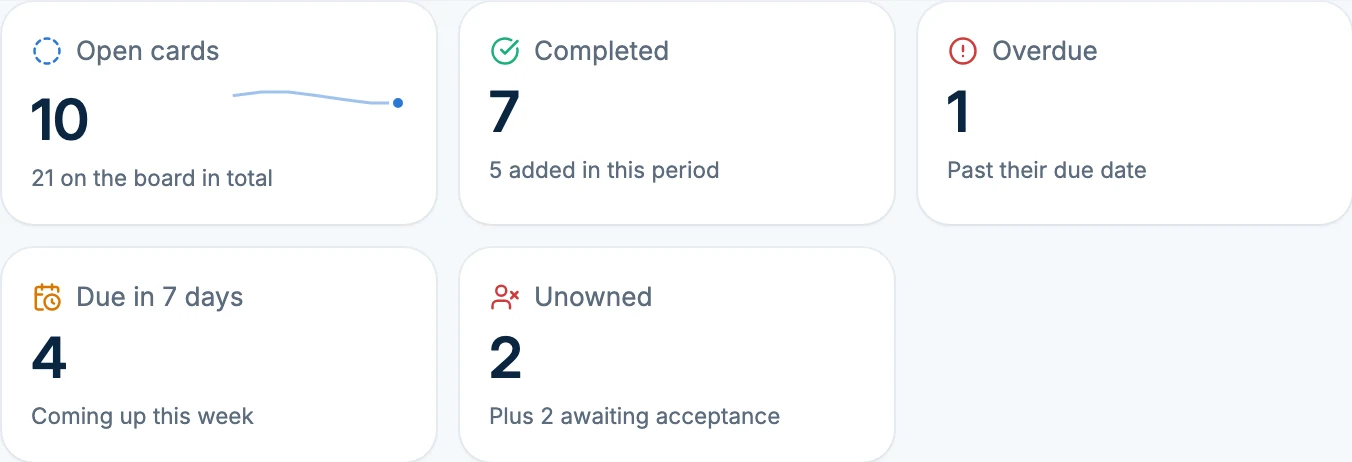
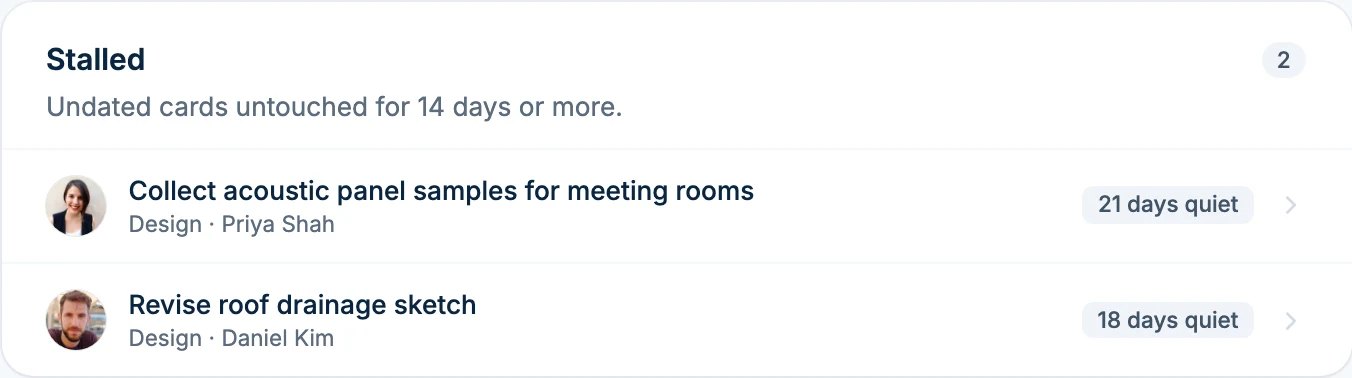
In Arkscape: these surface on their own. The report counts Unowned cards, lists Stalled cards (open, undated, and untouched for 14 days), and shows each person's assignments they haven't accepted yet under Workload by person. In Arkscape, assigning a card asks the person to accept or decline it, so "I sent it to them" and "they agreed to do it" are never confused.
4. What you need from whom
Decisions, approvals, and answers, each with a name and a date. This is the part people act on, so never bury it.
In Arkscape: this part is yours to write, because no report knows which decision matters most. You can stop it from getting lost in email, though. Put the decision on a card and add the client or consultant to it with Add people. They accept it, see only that card, and you both see when it's done. Clients and consultants join free.
Your team and your client need different updates
| Team update | Client update | |
|---|---|---|
| Purpose | Keep everyone working on the right things | Keep the client informed and decisions moving |
| What goes in | Done this week, next week by person, what's stuck, what's unowned, what is waiting for someone to accept it | Milestones reached, what's next, decisions and approvals needed from them with dates, anything that changes the schedule |
| What stays out | Nothing you'd hide from the team | Internal workload, who was slow, small internal slips that don't move a date |
| Length | One screen | Short enough to read on a phone |
The client version is a summary of the team version, never a different story. If a risk affects the client's dates or budget, it belongs in both.
Two templates you can copy
A team update:
Northstar Offices: week of Oct 12

Done
- Issued revised door schedule (Maria)
- Coordinated level 2 ceiling heights with mechanical (Daniel)

Next week
- Lobby finishes package to client, Wed (Maria)
- Respond to fire engineer comments, Thu (Daniel)

At risk
- Beam sizes at the level 2 opening: asked of structural 9 days ago, not yet accepted. Blocks the steel order on the 24th.

Needs a decision
- Stone sample for the lobby floor: client approval needed by Fri.
A client update:
Northstar Offices: update for Oct 16

This week we issued the revised door schedule and finished
coordinating the level 2 ceilings with the mechanical engineer.

Next week we'll send the lobby finishes package on Wednesday.

We need your approval of the lobby stone sample by Friday to
keep the order on schedule.

Nothing has changed in the overall program.
Your Friday routine in Arkscape
- Open the project group's Reports tab and choose 7 days.
- Copy as text on Completed, and paste it under "Done".
- Read Deadlines for "Next week".
- Read Unowned, Stalled, and Workload by person for "At risk".
- Add "Needs a decision" yourself, then trim a copy for the client.
For your own update to a lead or a principal, open Reports from the ... menu on Your Ark. It covers your work across every project, and its copied list tags each card with its project. Every Friday, Arkscape also sends you a short week summary of your own work: what you finished, what's due next, and what's waiting for your answer.
If you've connected Claude or ChatGPT to Arkscape, ask: "Write this week's status update for the Northstar Offices group from what was completed and what's due next week." It reads the same report, with the same access you have, and gives you a draft to edit.
Reports show the work, never the person: they don't include time online or login activity. Group and personal reports are included on Arkscape's Business plans and on the Connect and Pro Personal plans. The weekly summary is free on every plan.
Should you use red, amber, and green?
Many templates start with a traffic-light status. It works for a quick scan across many projects, but a color on its own hides the one thing the reader needs: what is wrong and what would fix it. If you use one, follow it with a single line: "Amber: beam sizes are late from structural; we need them by the 24th to keep the steel order."
Common mistakes
- Listing activity instead of outcomes. "Reviewed drawings" isn't news. "Approved the stair details" is.
- Burying the ask. Put decisions and approvals in their own section, with dates.
- Changing the format every week. The same four sections, in the same order, let people find what they need in seconds.
- Sending the client the team version. They don't need to know who was slow; they need to know what you need from them.
- Writing it on a different day each week. Pick a day and keep it, so people expect it.
Quick answers
How long should a weekly status update be? One screen for the team. For a client, a few short paragraphs they can read on a phone.
Email or meeting? Both work. A written update before a short meeting means the meeting can be about decisions instead of reading out status.
Do I need software for this? No. A shared spreadsheet works if every task has an owner and a date and it's updated during the week. It stops working when you run several projects, because a spreadsheet doesn't tell you when something goes quiet. That is the job Arkscape's reports do.
What if nothing happened this week? Say so, and say why. "No progress on the lobby package while we wait for the stone sample decision" is a useful update.
How reports work in Arkscape · Share one task with a client or consultant