How architects and engineers work together
Two weeks before issue, the request for beam sizes at the level 2 opening is message 14 of a thread called "Northstar coordination", between a question about the stair and a meeting time. The architect believes it's handled. The engineer read it as a heads-up. The sizes arrive on the afternoon of issue.
Engineers describe the mirror image: backgrounds that change after the beams are sized, and decisions agreed on a call they weren't on. Neither side is lazy. Requests get lost because they travel without a date, a reason, or a yes, and nothing shows them going quiet. The method below works from either seat, and it's how Arkscape, a project tracking tool for architects, designers, and engineers, keeps requests between firms.
Who owes what to whom
The exchange changes with each phase, but it always runs both ways. A typical office project with structural, mechanical, electrical, plumbing, fire, and lighting consultants looks like this:
| Phase | The architect owes the engineers | The engineers owe the architect |
|---|---|---|
| Early design | The brief, massing options, the grid, and what the client has asked for | Structural system and grid advice, rough spans and depths, plant room and riser sizes |
| Design development | Updated plans and sections, ceiling heights, openings, and decisions on finishes that carry weight or need services | Member sizes, shaft and riser sizes, ceiling void needs, fire strategy comments, the lighting layout |
| Documents | Backgrounds frozen by an agreed date, schedules (doors, finishes, fixtures), and answers to coordination questions | Drawings for coordination before the issue date, responses to comments, the final sizes the drawings rely on |
| Bidding and on site | Answers to contractor questions that touch design, and changes as they come | Answers to contractor questions that touch their systems, and review of proposed substitutions |
Every row hides dozens of small items: "Confirm beam sizes at the level 2 opening", "Coordinate shaft sizes with plumbing", "Send fixture schedule to the lighting designer", "Respond to fire engineer comments". Each one blocks something on the other side.
Who leads coordination depends on the contract. On most building projects the architect is the lead consultant and coordinates the engineers. On an infrastructure or industrial job the lead is often an engineer, and the architect is the consultant.
Write one request per item, with its reason
One request is one answer. "Confirm beam sizes at the level 2 opening" is a request. "Structural queries" is a pile, and a combined request waits until its hardest part is done. Each request names a person at the other firm, Tom Becker rather than "structural", and a date the answer is needed by.
Then say why it's needed and what waits on it: "Needed before the steel order on the 24th." "Mechanical needs the ceiling height to size the ducts on level 2." A request with a reason gets ranked properly against other work, and an engineer who knows what it blocks can often answer part of it early: "the opening needs a 600 mm deep beam; the connection detail follows Thursday."
In Arkscape, put the request on a card with the answer you need as its title and a due date, and write the reason and the drawing, grid line, or detail in its notes, which hold up to 5,000 characters. For a multi-part answer, such as beam size, connection detail, and fire rating, use Add checklist so each part can be ticked as it's resolved. Cards don't carry file attachments, so keep the drawings in Files (a personal file can go to Tom with Share) and name the sheet in the notes.
To share that one card with Tom, open its ... menu on Your Ark, choose Add people, and type his email address. He joins free and sees only that card and its discussion. A card holds up to 10 people besides you. The full setup is in how to share one task with a client or consultant.
Ask for a yes, and keep the answer with the request
A request is only on someone's plate when they agree to it, so ask for a yes with the date, or a no with a reason. A no is useful: "I can't confirm before the 24th because the wind loads aren't final; I can do the 28th" lets you move the steel order today instead of finding out on the 23rd.
It works both ways. An engineer who asks "Can you freeze the level 2 backgrounds by the 15th?" and gets a yes has a date to plan around. Silence is a guess.
Keep the follow-up questions and the answer with the request, where both firms can see them. When the answer is a decision, write it on the request, so nobody draws from the version changed on a call.
In Arkscape, the person you add answers with Accept or Decline, from the notification or from Ark Requests on their board. Until they answer, the card's people list marks them as Invited, and signing up never accepts on their behalf. A decline can carry a message of up to 500 characters, which comes back to you in the Updates tab of your Ark Requests. Each shared card has its own discussion, visible only to the people on it, so the answer stays with the request.
For a long collaboration, with dozens of requests running both ways for months, create an external group for the project. It has its own Arkboard and Discussions, Files, and Reports tabs, open to people from other companies. Invite the consultant's team by search or with Invite via email, and assign their cards to them once they've joined. People you invite join free.
An external group holds 100 members by default on every plan. How many you can create depends on your plan: 3 per user on Business Growth and 5 per user on Scale, pooled across the company; 1 on the Free Personal plan, 5 on Connect, and 10 on Pro. It works from either side: an engineering firm can create the group and invite the architect.
A weekly routine
Once a week, read every open request in both directions: whether it has a yes, whether the date still holds, and whether anything has happened since. Chase the ones with no yes first, then the quiet ones, then the late ones, and read what you owe them too. A short weekly call works better with this list in front of everyone than with an agenda of "any updates". In Arkscape, the routine runs like this:
- After each coordination meeting, turn every request into its own card with a due date.
- For a one-off request, share the card with Add people. For a project-long collaboration, create the card on the project's external group board and assign it to the consultant.
- Check that each card shows a yes. Anyone still marked as invited after two days gets a nudge in the card's discussion.
- Read declines in the Updates tab and act on the reason the same day: a new date, a partial answer, or a different person.
- Before the coordination call, open the group's Reports tab and read Delegation and Workload by person.
The Delegation panel shows Waiting on someone now, Open with no owner, Median time to accept, and Acceptance rate. Workload by person has an Awaiting column for each person, consultants included once they're members. The Unowned tile shows open cards with nobody responsible, plus how many are awaiting acceptance.
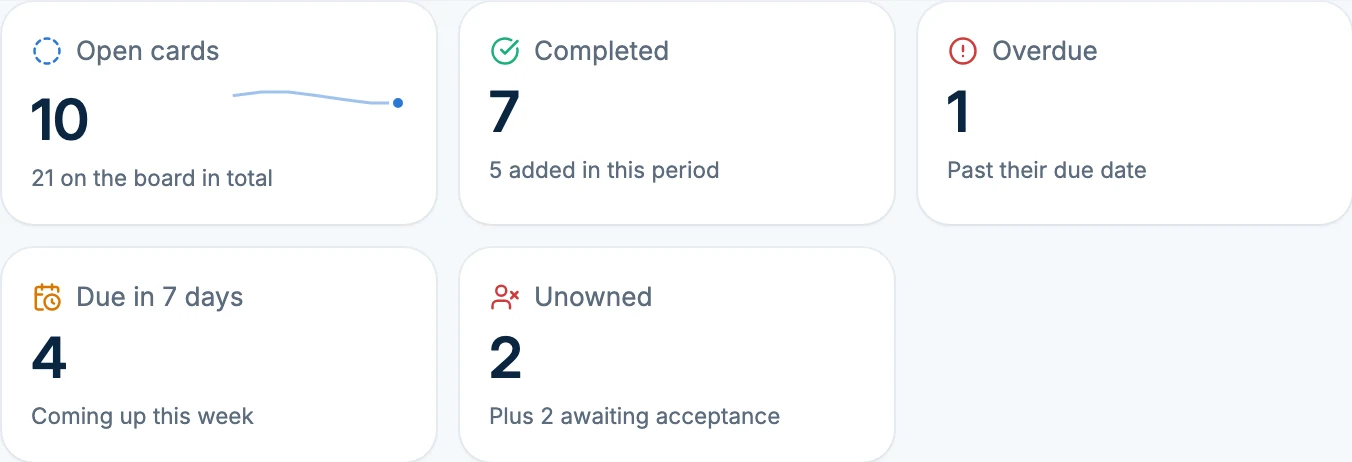
Group reports follow the plan of the group's owner: every Business plan includes them, and so do the Connect and Pro Personal plans. The Free plan doesn't.
Where this method stops
What a consultant is obliged to provide, and what counts as additional services, is set by the consultant agreement. A tracker shows what was asked and answered, not whether it was in scope, and Arkscape doesn't track fees. Contractor questions and substitution reviews often follow a procedure set by the contract, with its own logs and response times; follow it, and use this method for the coordination around it.
Whether the duct fits under the beam is answered in the model and the drawings. The tracker only makes sure someone has been asked to check, by when.
If the same firm misses agreed dates month after month, that's a conversation between principals, and possibly a different consultant next time.
Common questions
How do I get consultants to respond on time? Ask for one thing per request, give a date with the reason behind it, and ask them to accept or decline. A request with a reason and a yes gets answered far more often than a question buried in a thread.
How do I track consultant deliverables? Keep a list with one row per item: what's needed, who owes it, the person's name, the date, whether they've accepted, and what it blocks. The architecture project tracker guide shows a sheet with an Owed by column for this, so you can filter to everything consultants and the client owe you.
Should consultants be in our project tool? For a long collaboration, yes, in a space for that project only. For a single question, share just that task. Either way they should see what they owe, not your whole studio.
Do consultants need to pay to use Arkscape? No. The people you invite join with free accounts, and shared cards work on every plan, including Free.
Read next: everything about shared cards, internal and external groups, and how to delegate tasks to team members.