Asana alternatives for architects and designers
Asana does the core job well: a task, an assignee, a date, and a timeline to put them on. The reasons to look elsewhere sit around it: fees tracked in another tool, a project structure someone has to build, and a task that looks handled the moment it's sent.
Notion suits studios that want docs and tasks built together, and monday.com is the closest like-for-like swap. Arkscape, a project tracking tool for architects, designers, and engineers, is one of the seven alternatives below, with the same fields as the rest.
Arkscape makes one of the tools below. Prices checked on vendors' own pages in October 2026.
What Asana does well
Asana shows a project's tasks as a list, a board, a timeline, or a calendar. Timeline and Gantt views come with the Starter plan, the first paid tier, where many tools hold them back for a higher one.
Guests are free. Asana's pricing page says Starter's "Unlimited free guest seats let clients and contractors collaborate without increasing your license count." For a studio whose projects always include a structural engineer, a services engineer, and a client, that matters more than the per-seat price. Enterprise adds view-only licenses for people who only need to see progress.
The Personal plan is free for up to 2 users, with unlimited tasks, projects, and storage (100MB per file), but no timeline. Time tracking is there if you pay for it: the Advanced plan tracks estimated against actual time on a task, and a Timesheets and Budgets add-on is available on Starter, Advanced, and Enterprise.
It is also easy to start. On the AIA Community Hub in 2020, one architect wrote of Asana: "It was pretty easy to convert from our paper/pencil and excel spreadsheet methodology to this software."
Where Asana falls short for architects, designers, and engineers
Asana has no native invoicing, and its time tracking sits on Advanced or in the paid add-on, whose price isn't published on the pricing page. So a firm that bills by the hour runs two tools: Asana for the tasks, and something like Harvest or QuickBooks for time and invoices. An architect described exactly that setup on the AIA Community Hub in 2022: "Quickbooks and Quickbooks Time, and use Asana for project management."
Asana gives you projects and tasks, and leaves the shape of an architecture project to you: phases, consultants, issue dates, client decisions. Someone in the studio builds that and keeps it consistent across projects. In a 2026 Archinect thread asking whether any tool works for architecture firms, the original post listed Monograph, Asana, Monday, Notion, and Teams and said "none of them really meet the needs of the office in developing a project", adding: "They're either too generic, too complex to get a whole office to adopt".
What Asana costs at a real studio size
Asana isn't expensive at the entry tier. The cost climbs when you need its time tracking, because Advanced costs more than twice as much per person as Starter. Here is what 10 people pay for each tool's entry paid plan, and for the plan that adds time tracking where it exists:
| Tool and plan | 10 people, billed yearly | 10 people, billed monthly |
|---|---|---|
| Asana Starter | $109.90 a month | $134.90 a month |
| Asana Advanced (time tracking) | $249.90 a month | $304.90 a month |
| monday.com Basic | $90 a month | Not shown on the page |
| monday.com Pro (time tracking) | $190 a month | Not shown on the page |
| ClickUp Unlimited (time tracking) | $70 a month | $100 a month |
| Notion Plus | $100 a month | $120 a month |
| Trello Standard | $50 a month | $60 a month |
| Basecamp Studio (flat, any number of users) | $59 a month as listed | Not shown separately |
| Arkscape Business Growth | No yearly price | $250 a month |
Asana's free guests keep the bill at your own headcount, which is not true of every tool here. Its pricing page doesn't define who counts as a guest, so check how your consultants' email addresses are treated before you rely on it.
Does assigning a task in Asana mean it's accepted?
No. Assigning a task puts it on the other person's list straight away. Asana's own page puts it this way: "any task assigned to you automatically appears under Recently Assigned in My Tasks." That is quick, and it means the task looks handled the moment it's sent. Whether Daniel agreed to respond to the fire engineer comments by Thursday, or even read the task, is something you find out by asking him, usually on Wednesday.
Most tools work like this, which is why the workaround is a habit rather than a feature: ask for a yes or a no with a reason, and treat the task as yours until you get one. The full method is in how to delegate tasks to team members.
The alternatives
Prices are per person per month unless the tool charges a flat price.
Basecamp
Basecamp organizes project communication: to-dos, message boards, chat, docs and files, schedules, card tables, and Hill Charts, grouped per project. It fits small studios that work closely with clients and consultants and want one price that doesn't grow with headcount. An architect at a 10-person office wrote on the AIA Community Hub in 2022 that it "requires little to no training, quick to setup" and "We use it daily with our consultants and engineers".
It's flat, not per user. Free covers 1 project and up to 5 users. Freelancer is $25 a month (up to 20 users, 3 active projects), Studio $59 (unlimited users, 10 active projects), Pro $99 (25 active projects), and Unlimited $299 a month, billed annually. Consultants and clients count as users, so they count toward the 5-user and 20-user caps on Free and Freelancer; from Studio up they cost nothing extra. Client mode sets what clients can see, project by project.
Choose it if you run up to 10 active projects at a time with a lot of client conversation, and want time tracking (on every plan) without paying per person. Choose something else if you run more than 10 active projects (Pro covers 25, and unlimited projects need the $299 annual plan), or you need a Gantt chart: Basecamp has a Lineup timeline of projects, not a Gantt with dependencies.
monday.com
monday.com is configurable boards for tracking work items, statuses, and owners. It fits teams of 3 or more who like to design their own boards and columns. One poster on the AIA Community Hub in 2020 found it "not great once you have more than a few projects, and everything needs to customized".
Per seat, billed yearly, Basic is $9, Standard $12, and Pro $19, from 3 seats. Monthly billing costs more, but the monthly rates aren't shown on the page. It's free for up to 2 seats and 3 boards. Timeline and Gantt views start on Standard; time tracking starts on Pro. Read-only viewers are free and unlimited from Basic. Guest access, for external users who see only the boards you invite them to, starts on Standard, and the pricing page doesn't say how guests are billed.
Choose it if you want Asana's kind of tool with more control over how each board looks, and you're happy to spend the setup time. Choose something else if consultants need to edit as well as read and you want to know the price of that up front, or nobody in the studio wants to own the configuration.
ClickUp
ClickUp holds tasks, docs, goals, and time tracking in a workspace with many configurable views. It fits budget-conscious teams that want time tracking and a Gantt chart at the lowest paid tier and are willing to configure a lot. An architect at a 10-person office described running BQE Core for time and invoicing "in conjunction with ClickUp for schedule, task and SOP management and Slack for internal communications" (AIA Community Hub, 2022).
Unlimited is $7 billed yearly or $10 billed monthly; Business is $12 yearly or $19 monthly. ClickUp is also rolling out a new Core plan at $9 billed yearly to some workspaces. The Free Forever plan has 60MB of storage, with Gantt and time tracking as trial uses, and allows unlimited members and guests. On Unlimited you get 5 guest seats for the first paid user plus 2 for each additional one, so a 10-person team has 23. Read-only guests are unlimited on paid plans.
Choose it if you want native time tracking and a Gantt chart for the least money, and one person in the studio enjoys setting tools up. Choose something else if you want a tool the whole office can use without configuring it first, or you need timesheets, which ClickUp puts on Business and above.
Notion
Notion is a workspace of docs, wikis, and databases, where projects and tasks are databases with views. It fits studios that want project tracking next to the written work: briefs, specifications, standards, and the office wiki. You build the structure yourself.
Plus is $10 billed yearly or $12 billed monthly; Business is $20 yearly or $24 monthly. The Free plan limits blocks once there are 2 or more members and caps uploads at 5 MB. Guests are free and see only the pages they're invited to: 10 on Free, unlimited on paid plans.
Choose it if your studio's real problem is that knowledge is scattered, and tasks are the second problem. Choose something else if you want task tracking that works the day you sign up. Notion's pricing page doesn't list time tracking, and a project database is something you design and maintain.
Trello
Trello is boards of cards and lists for tracking tasks, with more views on higher plans. It fits small teams that want the simplest possible board. An Archinect user wrote in 2015 that Trello "seems easy enough to get to grips with".
Standard is $5 billed yearly or $6 billed monthly; Premium is $10 yearly or $12.50 monthly. It's free for up to 10 collaborators and 10 boards per Workspace. The timeline view needs Premium. On Standard and Premium, a guest who works on 2 or more boards is billed at the same rate as a member.
Choose it if you want a cheap, clear board per project and don't need a timeline or reports. Choose something else if you need a timeline below Premium, time tracking (the pricing page doesn't list it), or consultants who work across several of your project boards without each costing a seat.
Monograph
Monograph is practice management for architecture and engineering firms: timesheets, phase budgets and fees, invoicing synced to QuickBooks Online, staffing forecasts, and reporting. It fits firms that need to know whether each phase is making money. A small-firm user on Archinect wrote in 2025: "It is doing everything my small firm needs and I love it." In the same thread another user said "They took over a year just to add PTO tracking".
The price isn't published. The pricing page shows a calculator range of $45 to $490 a month without saying whether that is per user or per firm, and buying starts with a demo. There's no free plan. No client or guest login is described on its pricing and plan pages; consultant tracking there is a record of consultants by phase, not access for them.
Choose it if fees, hours, and invoices are the problem you need solved, and task tracking can be simpler. Choose something else if you don't bill by phase or by the hour and mainly need to know who is doing what by when.
Arkscape
Arkscape is project tracking and team task management for architects, designers, and engineers. Each project is a group with its own Arkboard of columns and cards, plus Discussions, Files, and Reports tabs. Each card has one Responsible person, who accepts or declines it. It fits studios and firms running several projects at once with consultants and a client, where the question is who is doing what by when, not hours and fees. Freelancers and consultants can run their own project groups on a Personal plan.
Personal plans are Free ($0), Connect ($10 a month), and Pro ($20 a month). Business plans are Growth at $25 and Scale at $40 per user a month, billed monthly only, with a 14-day trial (a card is required at checkout). Project reports come with every Business plan and with Connect and Pro, and follow the plan of the group's owner; the Free plan has no reports. The people you invite join free: invite them to the project group, or share a single card with Add people (up to 10 people besides you), and they see that card and its discussion, nothing else.
Assigning a card sends the person a request in Ark Requests, which they answer with Accept or Decline, and a decline can carry a message of up to 500 characters. Until they accept, the card stays off their Ark and shows "Invited, not yet accepted". Once they accept, the same card sits on the project board and on their own Ark, so there's one list, not two. The project's Reports tab counts what's unowned and what's still awaiting acceptance, and lists cards that are undated and untouched for 14 days as Stalled.
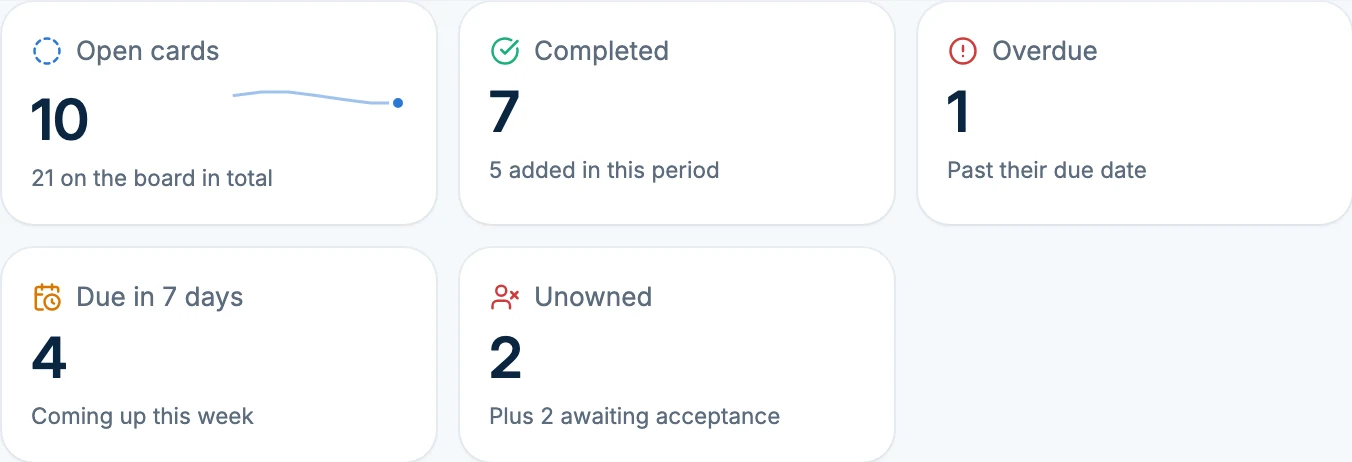
Choose it if delegated work keeps turning out to be unread, or the project plan and each person's own list keep drifting apart. Choose something else if you need timesheets, fees, or invoicing (Monograph), a Gantt chart or task dependencies (Asana Starter, ClickUp, and monday.com Standard have a Gantt view), list or table views, custom fields, or labels, a spreadsheet import, or native phone apps: Arkscape runs in the browser, on phones too, with Board and Calendar views. And if price per seat decides it, 10 people on Growth pay $250 a month, more than Asana Starter.
Comparison table
| Tool | Best for | Entry paid price | Free plan | Time tracking | Consultants and clients |
|---|---|---|---|---|---|
| Asana | Structured tasks with a timeline | Starter $10.99/user a month yearly, $13.49 monthly | Yes, 2 users | Advanced, or the Timesheets add-on | Unlimited free guests from Starter |
| Basecamp | Client-heavy projects at a flat price | $25 a month (Freelancer, 3 projects); $59 (Studio, 10 projects) | Yes, 1 project, 5 users | Every plan | Count as users; unlimited users from Studio |
| monday.com | Boards you configure yourself | Basic $9/seat a month yearly, from 3 seats | Yes, 2 seats | Pro ($19) | Free read-only viewers; guests from Standard |
| ClickUp | Time tracking and Gantt at the lowest tier | Unlimited $7/user a month yearly, $10 monthly | Yes | Unlimited; timesheets on Business | Guest seats grow with paid users |
| Notion | Projects next to docs and specs | Plus $10/member a month yearly, $12 monthly | Yes | Not listed | Free guests, page by page |
| Trello | The simplest board per project | Standard $5/user a month yearly, $6 monthly | Yes, 10 collaborators | Not listed | Guests on 2+ boards billed as members |
| Monograph | Fees, phases, timesheets, invoicing | Not published (demo) | No | Yes, with timesheets | No client login described |
| Arkscape | Who is doing what by when, accepted on the record | Business Growth $25/user a month, monthly; Personal from $0 | Yes (Personal Free) | No | People you invite join free |
For the wider field, including practice-management tools like BQE CORE and Deltek, see the best project management software for architecture firms.
How to switch from Asana
No tool imports Asana's history perfectly, so decide first what needs to move. Usually it's only the open work of live projects. Finished tasks can stay where they are as your record until you've decided whether you need them.
What carries over, whichever tool you choose: task titles, descriptions, due dates, and who is doing each task. What usually doesn't: comment threads, attachments, and any fields, views, or automations you set up.
Arkscape has no import, so moving means creating cards:
- Start with one live project, the one with the most consultant traffic, not all of them at once.
- List its open tasks with title, assignee, due date, and notes. However you get them out of Asana, a plain list is all the next step needs.
- Create a group for the project. Choose External if consultants or the client will join, because a group's type is fixed when it's created. Add columns for the stages you used in Asana, or start with Design, Coordination, Documentation, and Client.
- Create a card for each open task, with its due date and notes. Anything broken into smaller steps goes in the notes with Add checklist. Files go in the group's Files tab, since cards don't take attachments. If you've connected Claude or ChatGPT to Arkscape, paste the list and ask it to create the cards on the project's board: it can create up to 20 at once, each with its column, notes, and dates. Ask it to show you the list before it creates anything.
- Assign each card to its Responsible person yourself, since a connected assistant can't ask someone else to take a card. Each person accepts from Ark Requests, and anyone who declines tells you why. This step is new for most teams coming from Asana, and the first week shows you which tasks nobody had really taken on.
- Invite consultants and the client to the group, or share their one card with Add people. They join free.
- Move the next project once the first has run for two weeks and the team has stopped opening Asana for it.
If you track the projects in a spreadsheet for a while in between, the project tracker guide uses the same columns: Responsible, whether they accepted, who owes it, and the due date.
Common questions
Is Asana free for small teams? Only for 2 people. The free Personal plan is limited to 2 users and has no timeline view, so a studio of 3 or more pays for Starter: $10.99 per user a month billed yearly, or $13.49 monthly. Time tracking needs Advanced ($24.99 per user a month billed yearly) or the Timesheets and Budgets add-on.
Is Asana good for architecture and engineering projects? It's good for the tasks: who is drawing what, by when, on a timeline, with free guest seats for consultants and the client. It doesn't track fees or invoice, and its project structure is something you set up yourself. Firms that bill by phase usually pair it with a time and invoicing tool or use practice-management software such as Monograph.
Asana vs monday for a design studio: which is better? They're close. Asana includes a timeline and free guests from its first paid plan ($10.99 per user a month billed yearly); monday.com's timeline starts on Standard ($12 per seat billed yearly), its time tracking on Pro ($19), and paid plans start at 3 seats. monday.com gives you more control over how boards look, and more to configure. Neither invoices.
Can I import my Asana projects into Arkscape? No. Arkscape has no import, so you create the cards yourself, or ask a connected AI assistant to create them from a list, up to 20 at a time. You assign each card yourself, and each person accepts it.
Read next: how assignments work on Arkboards, how to share one task with a client or consultant, and how to delegate tasks to team members.